BZ Games App guide: BZ.COM on your phone
Open BZ.COM in your phone's browser, save it to your home screen and you have the full sportsbook — esports, table tennis, hockey — wherever you are in Canada.
 5 USDT
Illustration · prices are a moving preview
BZ mobile betting, the way you already watch esports
Esports viewers rarely sit in front of a single screen. The stream runs on a laptop or TV, chat runs on a phone, and that is where a bet naturally happens. BZ.COM's responsive layout keeps the core flow — find an event, tap a price, confirm the slip — within thumb reach.
The desktop sidebar (Live Events, Upcoming, My Bets, My Favourite and the sport list) folds into a menu, and the account balance with the Deposit button stays at the top. Prices are in decimal format, matching what you see on desktop.
Because it is one account, you can start on a phone during a commute and check results later on a computer.
Android and iPhone: getting BZ.COM on screen
No store link is listed here because we could not confirm one. These steps use your phone's own browser, which works on both systems.
Android access
- Open Chrome (or your preferred browser) and go to BZ.COM via the button below.
- Sign up or log in. For a new account, add FREE5USDT in the Referral Code field.
- Tap the three-dot menu and choose Add to Home screen.
- Check the Download App item in the BZ.COM menu for any device-specific option BZ.COM provides.
iPhone / iOS access
- Open Safari and go to BZ.COM via the button below.
- Create your account and enter FREE5USDT during sign-up.
- Tap the Share icon, then Add to Home Screen.
- Launch BZ.COM from the new icon — it opens straight to the sportsbook.
Stay safe: only install betting software from sources BZ.COM itself points to. Files offered on unrelated websites or in messages can be tampered with.
What you can do from the phone
Live Events
In-play markets grouped by sport, from eBasketball to table tennis.
Upcoming
Plan around European and Asian schedules that land at odd hours in Canada.
My Bets
Open and settled bets in one list.
My Favourite
Pin teams and events you follow.
Live Support
Reach support from the menu without switching devices.
Responsible Gambling
The tools page is in the same menu as everything else.
Registering on mobile, in four taps
- Tap Sign up on BZ.COM.
- Enter an email address or phone number and a password.
- Open Referral Code (Optional) and type or paste FREE5USDT into the Invitation Code box.
- Confirm the age and User Agreement checkbox, then tap Sign Up.
The full walkthrough with screenshots is on the bonus code page.
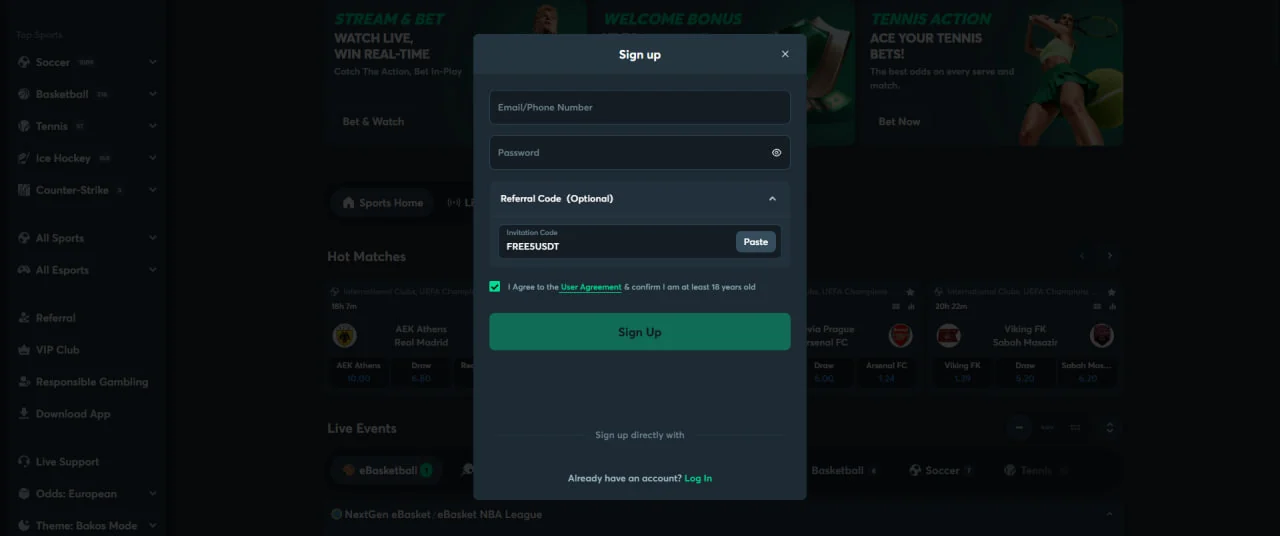 Same form on mobile · Invitation Code field
Free on sign-up, no deposit. Enter the code during mobile registration exactly as you would on desktop.
BZ mobile FAQ
Your phone is already the app
Open BZ.COM, register with FREE5USDT and keep the shortcut on your home screen.
